
When opening up an Office 2016 application (Word, Powerpoint, Excel), no recent files are available.
Note: Resolving this error requires removing a folder that is hidden by default. If you do not feel comfortable doing this feel free to contact the helpdesk for assistance.
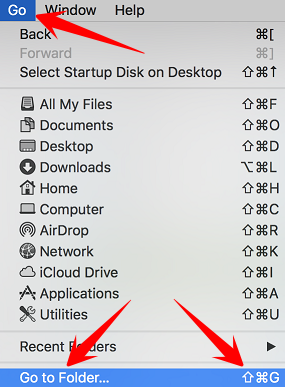
Open up a new Finder window, then open up Go To Folder by selecting Go > Go to Folder from the menu at the top of the screen. Alternately, you can use the keyboard shortcut Shift+Command+g.
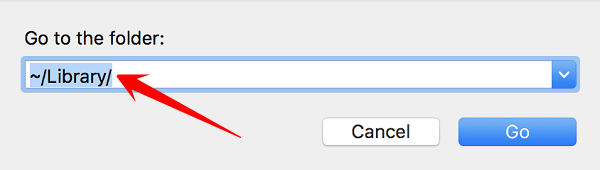
Enter "~/Library/" in the window that pops up, then click on Go, or press Enter on the keyboard.
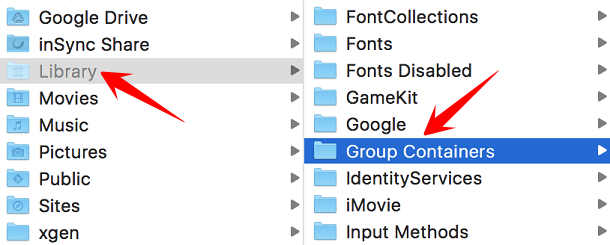
In the Library folder select the Group Containers folder.
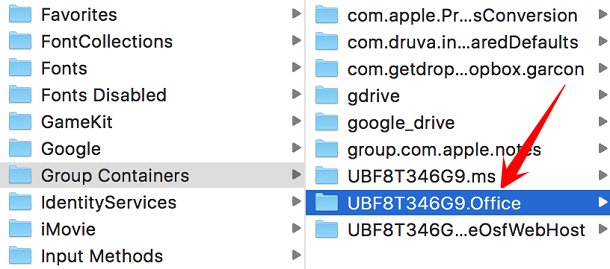
In the Group Containers folder select the UBF8T346G9.Office folder.
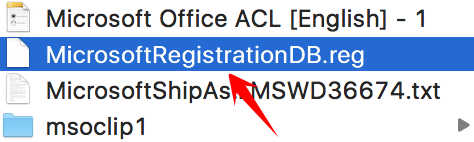
Inside the UBF8T346G9.Office folder find and delete the MicrosoftRegistrationDB.reg file. You might see a dialogue box pop up asking for confirmation. If so, go ahead and confirm that you want to delete this file.
Office for Mac 2016 should once again show your recent files.
Comments
0 comments
Please sign in to leave a comment.