
The VCS board has chosen Boardvantage by MeetX to streamline creation and dissemination of board materials. MeetX/Boardvantage (shortened as BV) provides online, easily accessible content to the VCS board of directors and executive team members.
In order for the boardbook to be created, members of the senior management team must first contribute content, which president's office staff compile online using the BV portal. Board members then use either their iPad or a laptop to access board materials via either the MeetX/Boardvantage app (available in the app store here) or online via web browser here.
An overview of how the Boardbook is compiled
- Content is created by senior managers
- Senior managers (contributors) upload content to a specific folder in Google Drive
- President's staff retrieve content and organize in BV
- A boardbook is created and shared with the team
Contributors (exec team, senior managers, their admin assistants and others) create content using whatever tools with which they are comfortable. They then make that content available to President’s office staff by uploading to a shared Google Drive folder called "Board Packets." 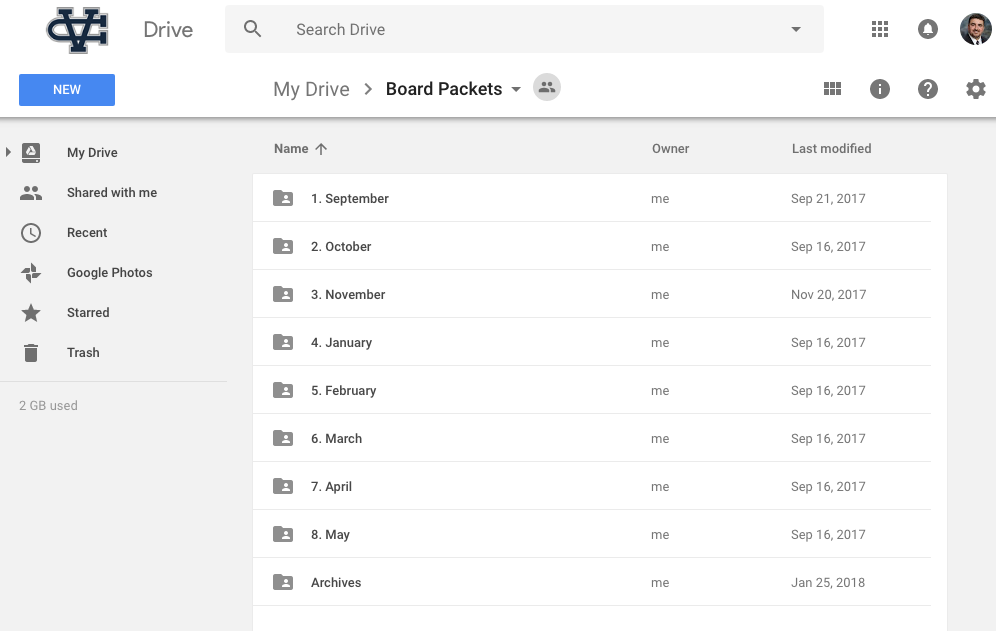
President's office staff then compile that content into BV, where it is organized and combined into a cohesive board packet (called a boardbook).
The boardbook is then securely accessed online by the board of directors in the days leading up to the board meeting using either an iPad or other computing device of their choice.
Who has access to the Board Packet Google Drive folder?
The following staff have access to the Board Packets folder on Google Drive
- Cliff Daugherty
- Gabe Guven
- Jennifer Stewart
- Kristi MacMillan
- Karina McCann
- Eric Scharrenberg
- Lisa Samuelson
- Pam Watson
- Troy Gunter
- Maribeth Wiens
- Brian Clemons
- Jerry Merza
- Ken Shilling
- Steve McMinn
- Mike Annab
How do I access the Board Packets Google Drive folder?
Like any shared Google Drive folder, it will appear in the “Shared with me” section of Google Drive. Simply log in to Google Drive using your Warriorlife.net account and click the "Shared with me" link. You will see a folder called "Board Packets."
Once in "Board Packets" simply click on the current month, and then click on the folder that corresponds to your area.
This is where you will upload all pertinent documents.
Please remember to use the following descriptive naming convention when naming your files. This will make it much easier for staff to hyperlink each document to the agenda in the boardbook.
- If you only have 1 document, name it by campus or area and include the date
- HS Board Report January 2018.docx
- VPA Board Report January 2018.docx
- If you only have multiple documents, note your area, use descriptive titles that correspond with the board agenda, and include the date
- FABS EOY Report January 2018.docx
- FABS Budget Calendar January 2018.pdf
- Dev EOY Giving Report January 2018.xls
It is not necessary to send an email when you or your staff have uploaded the documents since staff will be continually monitoring the folder for documents.
You may upload documents in any common file format- BV will accept it. This includes .docx, .xls, .pdf, .jpg, etc.
Documents must be received no later than the deadline of the Wednesday prior to the following Monday's board meeting. If this day falls on a vacation, instructions will be sent to senior managers.
Comments
0 comments
Article is closed for comments.