
If outlook won't open and hangs or you receive a notification that your offline data file is corrupt, follow the procedures below and delete your cached Outlook offline database file. Please note, no data is at risk by deleting the file, this is a cached copy for offline use.
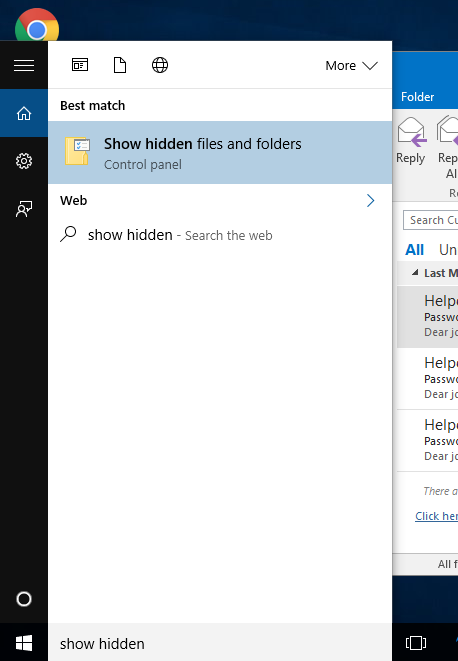
1. The *.ost file is hidden by Windows. To access the file, click the Windows button and type Show Hidden.
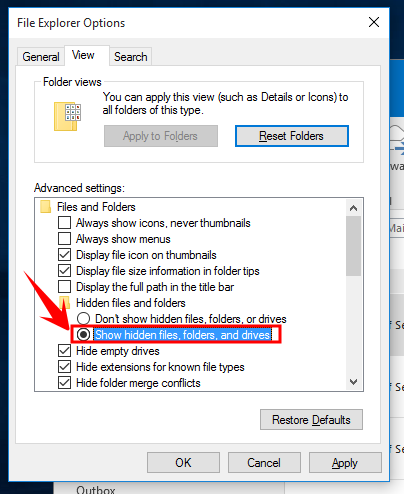
2. Next, check the box Show hidden files, folders, and drives
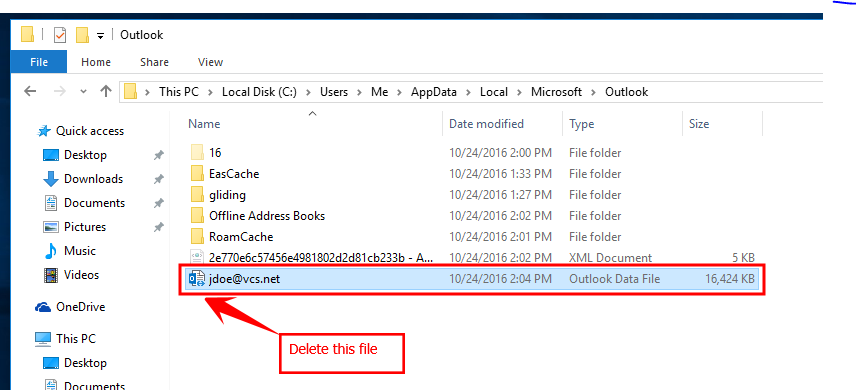
3. Browse to: c:\Users\%userprofile%\AppData\Local\Microsoft\Outlook and you should see username@vcs.net as shown below. Delete this file (If you can't delete the file then Outlook is running, close Outlook).
4. Open Outlook and the new file will generate automatically. Note if your email is large, it could take some time for all your emails to download.
Comments
0 comments
Please sign in to leave a comment.